Writes and fixes your scripts.
It reads how your game already works, edits with exact diffs you can open, and checks every script it writes for errors before it moves on.
Luafox is an AI agent that works inside the Roblox Studio place you have open. It writes and fixes Luau scripts, builds and animates, brings in models from Blender, then playtests the result and checks its own work.
Scripts, builds, animation and testing, in the Studio you already use. You see every step, and nothing is hidden from Ctrl+Z.
It reads how your game already works, edits with exact diffs you can open, and checks every script it writes for errors before it moves on.
Parts, models, UI and lighting, with properties set and Creator Store assets it has looked at first.
Every change is one undo step in Studio. A batch that fails partway is rolled back, not left half done.
For a system across many scripts, it hands parts to helper agents that work at once, each on its own scripts.
For an API it is unsure of, it searches the web and the Roblox docs, reads the best sources and cites them.
It starts a test, reads the Output, fixes what broke and tests again, then tells you what it verified and what it did not.
A require that finds nothing, a remote fired but never handled, a circular require: its checker finds them before you press Play.
Luafox models in the Blender scene you have open, with a live 3D preview in chat that updates after every change, then brings the result into your place. The add-on is inside the connector: switch Blender on in its window and it installs itself.
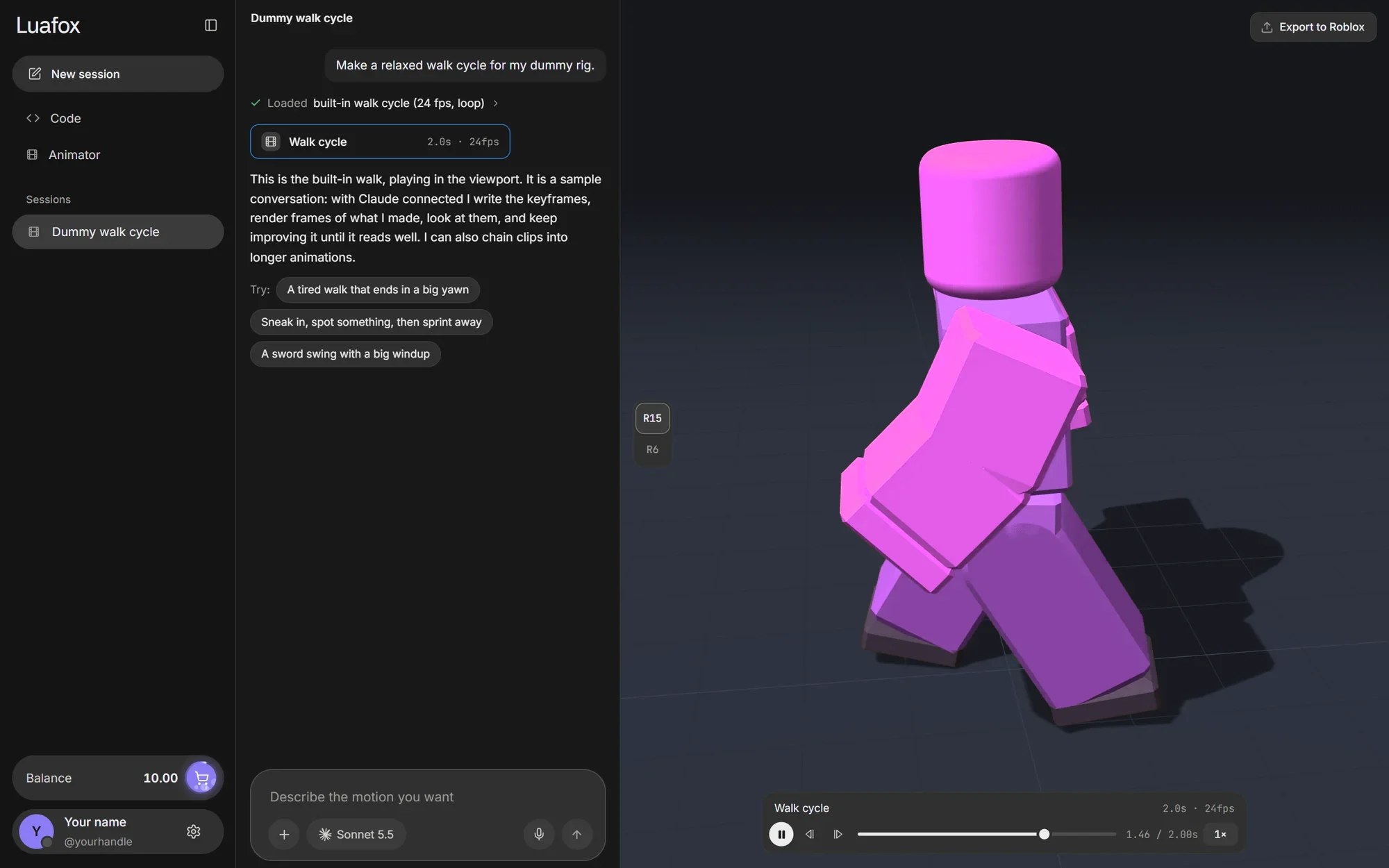
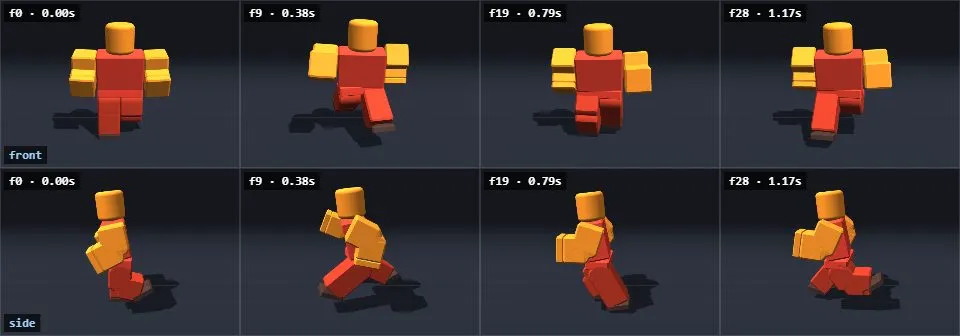
Describe a motion and Luafox keyframes it on an R15 or R6 rig, renders frames of what it made, measures foot slide and joint speed, and keeps fixing until it reads well.
Connect any MCP server, by a command or an HTTP URL, and its tools are Luafox’s too. Servers you set up in other apps are found on your computer and added in one click.
A library of 21 skills on Luau and Roblox, from remotes and DataStores to combat and monetization. It loads one only when the task needs it, so you do not pay for the rest.
Switch the model menu to My Subscription and Luafox runs on the plan you already have, with all of its tools. The model time comes out of your plan, not your Luafox credits.
Open Luafox in your browser and sign in with Google. There is nothing to install to start.
Add the plugin to Studio. It shows a short code: type it into Luafox while you are signed in, and that Studio is yours and only yours.
Watch each step, open the script diffs, and undo with Ctrl+Z. Chats are saved to your account.
 Luafoxyour account, credits and chats
Luafox runs in the browser. These connect Studio and the programs on your computer to it. They only reach out to Luafox, and what they are allowed to do is switched on that computer, in the connector's own window.
One file. Put it in Studio’s Plugins folder and restart Studio. It shows a code to type into Luafox, and from then on it only makes requests out to Luafox.
LuaFoxWeb.rbxmxA small app that connects out to Luafox from your computer, with an icon in the notification area. It has the Blender add-on inside and installs it for you, and while it is open it keeps the Studio plugin up to date. A small window has a switch for each part. The Windows installer needs no Python and no admin rights. It is not code-signed yet, so Windows may say “Windows protected your PC”: choose More info, then Run anyway. MCP servers that start with npx or python still need Node or Python installed.
luafox-connector-setup.exe Mac, Linux or advanced: luafox-connector.pyzThe same models, bought at discounted rates of up to 12x below list price, so your credits buy much more usage. Pick the model and how hard it thinks from the box where you type. Models that take images can look at your Studio screenshots, Blender renders and animation frames.
Credits are priced in money, so you can always work out what a task cost.
When a model call fails, it is not charged.
Luafox buys the same models at deep market discounts and prices credits well below list: up to 12x cheaper. The same money buys much more model time.
Credits pay for model time, and 1 credit is 5¢. Every task shows what it cost, and a model call that fails is free.
Everything, to try it on your own game.
20 credits to start
The everyday plan for a solo builder.
240 credits a month
For big systems and long sessions.
500 credits a month
For people who build most days.
900 credits a month
For people who ship all day.
1,300 credits a month
For studios and big teams.
2,800 credits a month
Anything else, ask in the app once you are in.
An AI agent for Roblox Studio. It works inside the place you have open: it reads and edits your scripts, builds, animates R15 and R6 rigs, brings in models from Blender, and playtests the result while reading the Output.
You add a small plugin to Studio’s Plugins folder. It makes requests out to Luafox and never listens for any, so nothing on the internet can call into your computer. The first time, Studio asks to allow HTTP requests to luafox.uk. The plugin shows a code, you type the code into Luafox while signed in, and that Studio is then yours alone. With the connector open, the plugin is kept up to date for you (switch that off in the connector’s window if you prefer); restart Studio after an update.
Yes. Every change is one undo step in Studio, so Ctrl+Z reverses it, and a batch that fails partway is rolled back. Script edits show a diff you can open.
Claude, GPT, Gemini, Kimi and DeepSeek models with Luafox credits, your own API key, or the ChatGPT or Claude plan you already pay for. You pick the model, and how hard it thinks, in the box where you type. The free plan starts on DeepSeek V4.1 Flash; Opus 5.5 and GPT-6.2 Sol need Fox, and Fable 5.2 and GPT-6.2 Astra need Alpha.
It is free to start: a new account gets 20 credits, and credits cost 5¢ each. Luafox buys the same models at deep discounts, so your credits go much further: up to 12x cheaper than list price. Every task shows what it cost, and a model call that fails is not charged. Paid plans (Fox, Alpha, Den, Pack, Apex), with more credits, AI generations and longer runs, are coming soon.
Switch the model menu to My Subscription and Luafox uses your ChatGPT plan through Codex, or your Claude plan through Claude Code, signed in on your computer through the connector. The model time is on your plan. Luafox charges one Function for each tool call that completes: $1 buys 1,000, and every account starts with 1,250. Failed calls are free.
You sign in with Google, through Supabase; Luafox never sees a password. Your Studio and your connector are paired to your account with a code, and Luafox keeps only a hash of each device’s token. A key for ElevenLabs or Roblox Open Cloud is saved on your own computer from the connector’s command line and is never sent to Luafox. If you use your own model API key, it stays in your browser and is sent only with a model request, never saved.
Yes. Run the connector on the same computer: it has the Luafox add-on inside and installs it in your Blender when its Blender switch is on. Once you allow it, Luafox models in your open scene with a live 3D preview in chat, then puts the mesh and its colour texture into Studio, or uploads it to your Roblox account when you ask. Running Python in Blender stays off until you turn it on, on that computer.
Luafox itself runs in your browser, and Roblox Studio runs on Windows and macOS. On Windows the connector is a normal app with an installer, so you do not need Python. On a Mac or Linux it is one Python file that needs Python 3.9 or newer. MCP servers that start with npx or python need Node or Python on that computer either way.
Sign in, connect your Studio place, and ask for the thing you have been putting off.
Start free Blender · Scene